Lagotto BI — White Paper
⚠️ Important note on the execution environment
This software is developed and tested on Raspberry Pi. This is not a limitation — it is an optimization discipline. Developing on hardware with limited resources forces developers to write efficient, smooth, and performant code.
Thanks to Docker, the same software runs identically on:
- Windows 11 or higher (and equivalent server editions) with WSL installed
- Linux with Docker support
- macOS
- Any hardware supporting these operating systems
The Raspberry Pi is our quality benchmark. Docker is the bridge to any infrastructure.
Lagotto BI
Self-hosted Business Intelligence for manufacturing SMEs
Version 1.0 — June 2026
Executive Summary
Manufacturing SMEs have data. It sits in the ERP, in the management system, in the company database. But they can’t see it — not quickly, not autonomously, not without depending on a consultant or an Excel export.
Lagotto BI solves this problem with an approach radically different from traditional BI tools: it installs on the company network, connects directly to the existing MSSQL management system, synchronizes data every 5 minutes, and exposes it through interactive dashboards configurable without technical skills.
No data leaves the company. No cloud subscription. No dependency on external vendors.
The Problem: Data Trapped in the ERP
Every manufacturing SME has a management system. NTS Business, Mexal, Gamma, AS400, or a custom system — it doesn’t matter which. What matters is that inside that system there are years of valuable data: revenue, customers, products, orders, agents, warehouse.
The problem is always the same: that data is only accessible through the management system itself, with pre-configured reports, limited filters, and zero possibility of cross-dimensional analysis.
The result:
- The owner receives an Excel report every Monday morning, prepared manually
- The sales director doesn’t know in real time how the month is going
- The purchasing office works on data that’s 24 hours old
- Every non-standard analysis requires the ERP consultant’s intervention
Enterprise BI tools exist — SAP Analytics, Power BI, Qlik — but they have costs and complexity out of scale for an SME with 20-200 employees. And above all, they send your data to someone else’s cloud.
The Solution: Lagotto BI
Lagotto BI is a self-service BI platform designed specifically for SMEs using MSSQL management systems.
What it does:
- Connects to the existing company management system via MSSQL connector
- Incrementally synchronizes data every 5 minutes to an internal database
- Exposes interactive dashboards with KPIs, charts, tables, pivot
- Allows users to configure and customize dashboards without writing code
What it doesn’t do:
- Does not replace the management system
- Does not move data to the cloud
- Does not require changes to the existing management system
- Does not require a DBA or data engineer for installation
How It Works — For Business
The flow is simple in three steps.
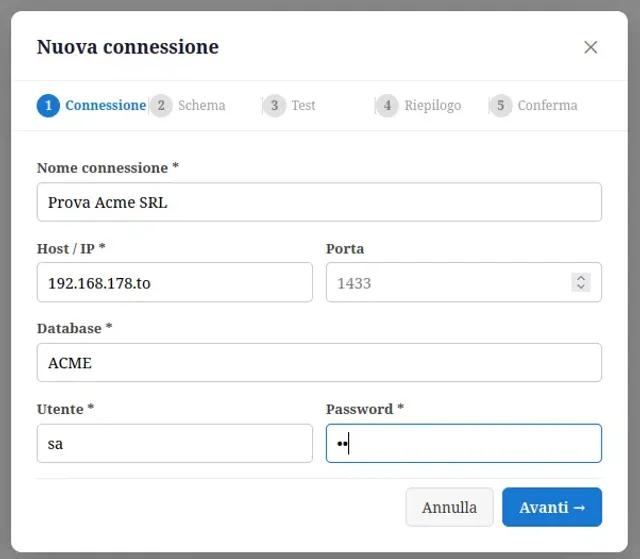
Step 1 — Connection. The administrator configures the connection to the company management system by entering host, port, database, and credentials. A guided 5-step wizard accompanies the process.
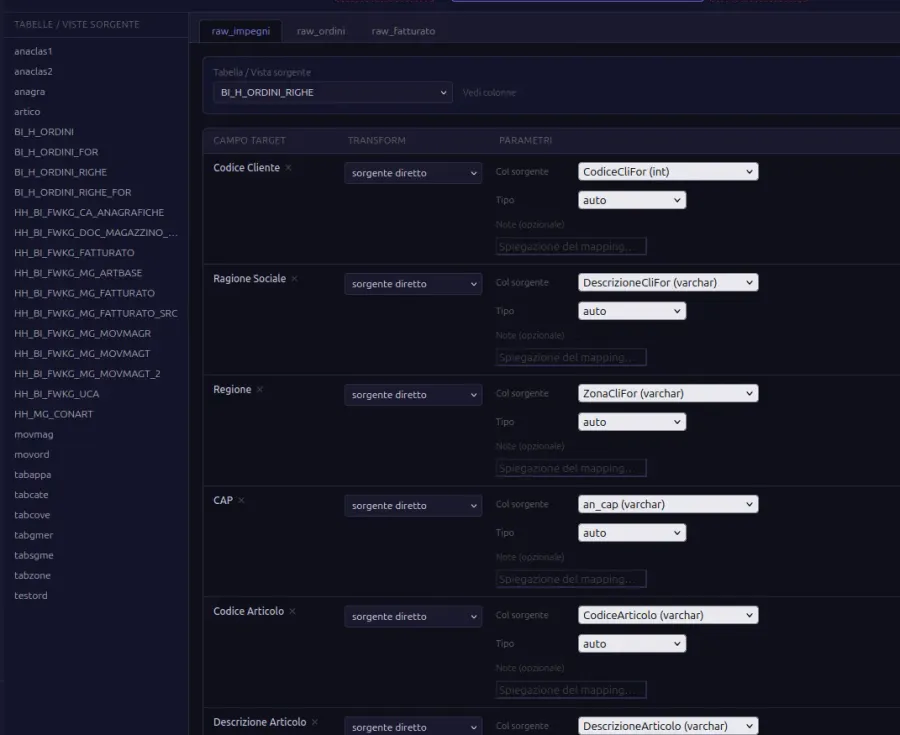
Step 2 — Mapping. Using the visual Mapper Builder, you define which management system tables feed which Lagotto BI fields. Zero code — just dropdown selection. For already-supported management systems, the mapping is pre-configured.
Step 3 — Dashboard. The 10 standard dashboards are immediately available. Revenue, customers, products, open orders, agent performance — everything configured and ready to use from the first launch.
Technical Architecture — For the CTO
Lagotto BI is a self-hosted application distributed as a monorepo with FastAPI backend and Vue 3 frontend.
Technology Stack
| Layer | Technology |
|---|---|
| Backend | FastAPI · Python 3.11+ |
| ORM | SQLAlchemy 2.x async |
| Internal database | MariaDB |
| Source connector | pyodbc / pymssql (MSSQL) |
| Sync scheduler | APScheduler 3.x |
| Authentication | JWT (python-jose) + bcrypt |
| Frontend | Vue 3 + Vite + TypeScript |
| Charts | Apache ECharts |
| Tables | Tabulator |
| Pivot | pivottable.js |
| Drag&drop layout | Vue Grid Layout |
| State management | Pinia |
Data Flow
MSSQL Management System ↓ pyodbc/pymssql (read-only) ↓ ETL Sync (APScheduler, every 5 min) ↓ Internal MariaDB (tenant-isolated) ↓ FastAPI REST API ↓ Vue 3 DashboardThe internal database is completely separate from the source management system — the connection is read-only. In case of network issues or management system downtime, Lagotto BI continues to work with the last available snapshot.
Security
- MSSQL credentials encrypted with Fernet (AES-256 key) at rest
- JWT authentication with access token (30 min) and refresh token (7 days)
- Multi-tenant with complete data isolation per MariaDB schema
- No telemetry with company data — only anonymous version ping (can be disabled)
- On-premise deployment: data never leaves the company network
Admin Panel
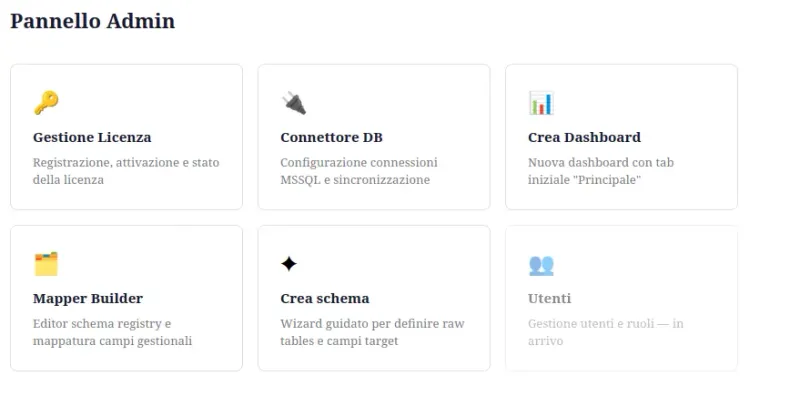
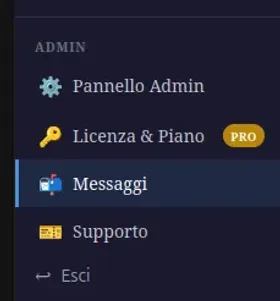
The admin panel centralizes all configuration operations: license management, DB connections, dashboard creation, Mapper Builder, schema registry, and user management.
Schema Registry
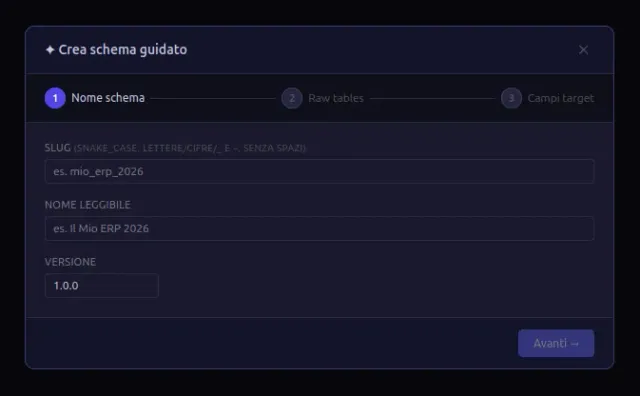
Each management system is described by a JSON file in schemas/. To add a new management system, no Python code modification is needed — just create the schema file following the documented template. The “Create schema” wizard guides the process in 3 steps.
Standard Dashboards Included (FREE Tier)
| Code | Name | Content |
|---|---|---|
| D01 | Revenue overview | YTD KPIs, monthly trend, customer mix |
| D02 | Customer analysis | Top customers, selected customer history |
| D03 | Product analysis | Top products, margin by category |
| D04 | Open orders | Orders to fulfill, remaining value |
| D05 | Agent performance | Agent ranking, quarterly trend |
| D06 | Month detail | Invoice lines, regional distribution |
Real-world Performance
One of the recurring doubts about self-hosted BI is scalability: does it work well with small datasets, but what happens when views get large?
Tests conducted during development with real production data showed near-zero widget load times on views with 200,000–300,000 rows, provided the source MSSQL views are well-structured and correctly indexed. Real-world row counts in a multi-year production environment would be significantly higher — the tests demonstrate the architecture scales.
The strategy combines incremental synchronization (only modified rows per cycle), server-side aggregation before transmission to the frontend, and a MariaDB layer optimized for analytical reads. The result is visible: the charts below are generated from real data, not demo datasets.
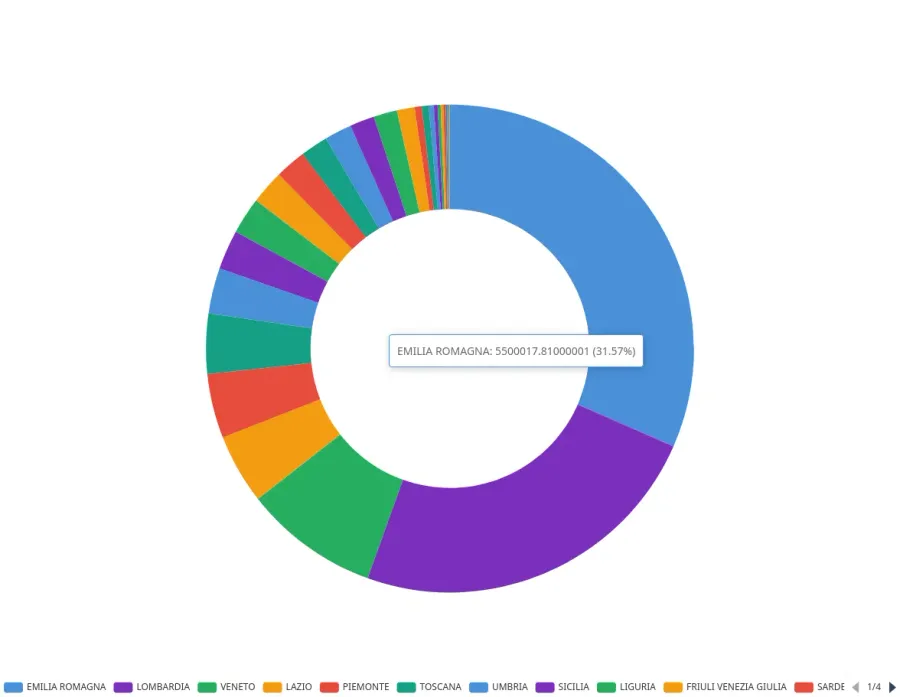
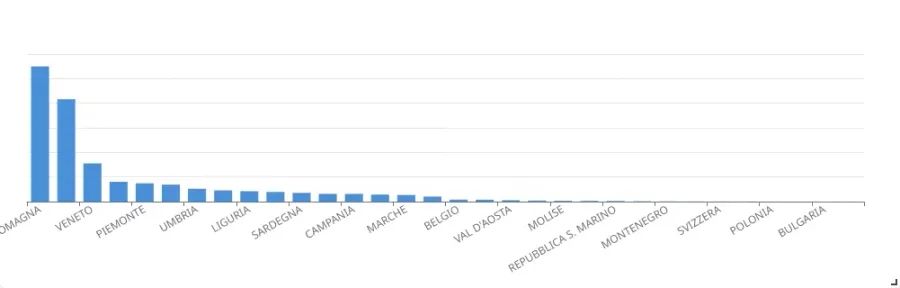
Both charts are standard Lagotto BI widgets configured on real views from the source management system. No manual pre-aggregation, no export, no user intervention beyond filter selection.
Supported Management Systems
| System | Status |
|---|---|
| A major Italian management system (active beta) | Real data synchronized ✓ |
| Mexal / Passepartout | Roadmap |
| Gamma Sistemi | Roadmap |
| AS400 (IBM) | Roadmap |
| Custom (free wizard) | PRO tier |
The list grows with each new beta customer. For management systems not yet supported, the Mapper Builder allows manual mapping configuration without writing code.
User Roles
| Role | Access |
|---|---|
admin | Full configuration, all data |
manager | Full read, all customers, no configuration |
agent | Own data only (automatic filter by agent code) |
User management is designed to be granular. The roadmap includes the ability to filter access at the level of individual widgets, individual dashboards, or individual filter fields.
The most common use case is a sales agent network: each agent sees only their own customers, orders, and revenue — with no other data visible or accessible. All that’s required is for the agent code to be present in the source data.
The MSSQL management system is never touched. Lagotto BI reads data in read-only mode, and a dedicated wizard creates any necessary views directly on the internal MariaDB — no stored procedures, no views, no modifications to the company database. The management system remains exactly as it was.
License Tiers
| Tier | Price | Main Features |
|---|---|---|
| FREE | Free | 10 standard dashboards, basic filters, 5 users, 1 datasource |
| PRO | To be defined | Unlimited dashboards, Widget Builder, pivot, visual themes, 5 users, 3 datasources |
| AI | Custom | Custom verticals, dedicated SLA, unlimited users, AI insights |
The license system verifies the tier at runtime — PRO features activate immediately after upgrade, without logout.
Our Guarantees
The FREE version will always be free. No future paywall on the base version. Users who start with FREE will never see a payment wall appear.
The PRO version is free for the entire beta period. Full access to all PRO features at no cost until the end of the beta period. No credit card required.
The end of beta will be communicated at least 30 days in advance. You’ll have all the time you need to decide whether to stay on PRO or return to FREE. No surprises.
Who’s Behind It
Lagotto BI is developed by lake8.dev, an independent software house.
The entire lake8.dev infrastructure is self-hosted on proprietary hardware, with public and transparent statistics at stats.lake8.dev/geo.html. What we say we do, we actually do.
How to Get Started
The Early Access program is open. 10 slots available, PRO free for the entire beta period.
Register at lake8.dev/early-access →
For technical or commercial inquiries: info@lake8.dev
Lagotto BI — lake8.dev © 2026 all rights reserved Third-party dependencies are released under MIT or Apache 2.0 license.
← Back to journal