Own the Repo, CI and Container Registry on Day One: A Founder Checklist for Outsourced Builds
Most outsourced builds don’t fail on the code. They fail the day the vendor stops answering.
I run a small software agency, and a good part of our work over the years has been picking up products another team left behind. The pattern is boringly consistent. The code is in a repo the founder can read, but the image is built from a base that lives in the old vendor’s private registry. CI runs under someone’s personal account. Production pulls :latest from a namespace nobody on the client side can log in to. Everything works until it doesn’t, and then nobody can rebuild it.
This post is the checklist I now hand to founders before the first commit. It isn’t theory. Every command and output below was run on a plain Debian 13 box with Docker 26.1 (exact environment at the end), against a small demo repo. You can reproduce all of it in about ten minutes.
The rule: a stranger with your credentials can ship
The test I use is simple. Give a competent engineer who has never met the vendor:
- read access to the repo,
- push access to your container registry,
- nothing else.
Can they clone, build, run and publish the exact service in production? If the answer is “they’d need to ask the agency for something”, you don’t own the product yet. Everything below exists to turn that answer into a yes, and to prove it with a script instead of a promise.
1. The repo lives in your organization
This sounds obvious. It’s also the item I see broken most often.
The repository must sit under an organization the company controls, with at least two people from the company as owners. The vendor’s engineers get invited as members or outside collaborators. They do not create the repo in their own org and “transfer it later”. Later never comes, or it comes during a dispute.
Put a CODEOWNERS file in from day one so ownership is written down in the repo, not in a contract appendix:
# Client-side engineers own every path. The vendor team is added as reviewers, not owners.* @acme-corp/platform-owners/.github/ @acme-corp/platform-owners/Dockerfile @acme-corp/platform-ownersCODEOWNERS only enforces anything when branch protection requires code-owner review, so turn that on for main too. If your git host is GitHub, you can check who actually owns things with the CLI (run these against your own org; the output depends on your account):
gh api repos/acme-corp/handoff-demo --jq '.owner.login, .owner.type'gh api "orgs/acme-corp/members?role=admin" --jq '.[].login'You want the first command to print your org name and Organization, and the second to list people on your payroll.
2. Pin base images by digest, not by tag
Tags move. python:3.12-slim today and python:3.12-slim in eight months are different bytes. That’s fine for a weekend project and terrible for a handoff, because the new team can’t tell whether a bug is theirs or the base image’s.
Pin the digest and leave a comment explaining why:
# Base image pinned by digest: a rebuild next year uses the same bytes.FROM python:3.12-slim@sha256:05cda9777409a9c3ffddd94a4c476b79f0769a0b4857f0c7ed9226b6800b0d6fTo find the digest of what you already pulled:
docker images --digests pythonREPOSITORY TAG DIGEST IMAGE ID CREATED SIZEpython 3.12-slim sha256:05cda9777409a9c3ffddd94a4c476b79f0769a0b4857f0c7ed9226b6800b0d6f df18428df8a0 17 hours ago 119MBUpdating the base then becomes a reviewed one-line pull request instead of an invisible side effect of rebuilding. Tools like Dependabot or Renovate can open those PRs for you.
3. No base images from the vendor’s private registry
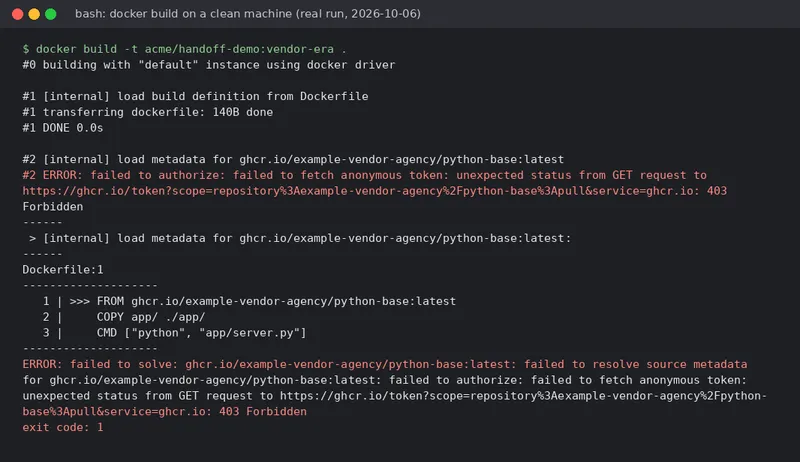
This one causes the most pain, so here’s what it looks like when it goes wrong. A typical “vendor era” Dockerfile:
FROM ghcr.io/example-vendor-agency/python-base:latestCOPY app/ ./app/CMD ["python", "app/server.py"]On the vendor’s laptops this builds, because they’re logged in. On a clean machine without their credentials, this is the real output (trimmed to the relevant lines):
$ docker build -t acme/handoff-demo:vendor-era .#2 [internal] load metadata for ghcr.io/example-vendor-agency/python-base:latest#2 ERROR: failed to authorize: failed to fetch anonymous token: unexpected status from GET request to https://ghcr.io/token?scope=repository%3Aexample-vendor-agency%2Fpython-base%3Apull&service=ghcr.io: 403 Forbidden------Dockerfile:1-------------------- 1 | >>> FROM ghcr.io/example-vendor-agency/python-base:latest 2 | COPY app/ ./app/ 3 | CMD ["python", "app/server.py"]--------------------ERROR: failed to solve: ghcr.io/example-vendor-agency/python-base:latest: failed to resolve source metadata for ghcr.io/example-vendor-agency/python-base:latest: failed to authorize: failed to fetch anonymous token: unexpected status from GET request to https://ghcr.io/token?scope=repository%3Aexample-vendor-agency%2Fpython-base%3Apull&service=ghcr.io: 403 Forbiddenexit code: 1(example-vendor-agency is a placeholder namespace, so the 403 here is real, but it’s the same error you’d get from a private namespace you have no access to.)
If the vendor has a hardened base image they like, fine. It gets copied into your registry, its Dockerfile goes into your repo, and your images build from that.
4. Every image says where it came from
When something breaks at 2 a.m., the first question is “what commit is running?”. OCI labels answer it without anyone’s chat history:
ARG GIT_SHA=unknownARG SOURCE_URL=unknown
LABEL org.opencontainers.image.source=$SOURCE_URL \      org.opencontainers.image.revision=$GIT_SHA \      org.opencontainers.image.title="handoff-demo"
Then anyone with the image can do this:
docker image inspect localhost:5000/acme/handoff-demo:203d8f1 \ --format '{{ index .Config.Labels "org.opencontainers.image.source" }} @ {{ index .Config.Labels "org.opencontainers.image.revision" }}'file:///tmp/client-git/acme/handoff-demo.git @ 203d8f1In real CI the source is your repo URL and the revision is the full commit SHA. GHCR also uses org.opencontainers.image.source to link a package to its repository.
While you’re in the Dockerfile, run as a non-root user. It costs two lines and it’s one less finding in the first security review after handoff:
RUN useradd --system --uid 10001 --no-create-home appUSER 100015. The registry is in your account
Production should pull images from a registry the company owns: GHCR under your org, ECR in your AWS account, Artifact Registry in your GCP project, or a self-hosted registry. The vendor’s CI pushes there with a scoped credential you issued and can revoke.
For the demo I used the official registry:2 image as a stand-in for “the client’s registry”:
$ docker run -d --name client-registry -p 5000:5000 registry:2be33ebd056ea7ac90d49ebd0a348e568c62fbc51739ad42ee1dd159665b591b5After a push, the registry API shows exactly what you own:
$ curl -s http://localhost:5000/v2/_catalog{"repositories":["acme/handoff-demo"]}$ curl -s http://localhost:5000/v2/acme/handoff-demo/tags/list{"name":"acme/handoff-demo","tags":["12d12c4","203d8f1"]}Notice the tags are commit SHAs, not latest. Deploy by digest or by SHA tag, so a rollback is a one-word change.
6. CI is a file in the repo, running under the org
CI configuration belongs in the repository, and the pipeline runs under the organization’s account, not under a vendor engineer’s personal one. Secrets live in the org’s secret store. Here’s the workflow from the demo repo, for GitHub Actions:
name: build-and-push
on:  push:    branches: [main]  pull_request:
permissions:  contents: read  packages: write
jobs:  image:    runs-on: ubuntu-24.04    steps:      - uses: actions/checkout@v4
      - name: Log in to the client's registry        if: github.event_name == 'push'        uses: docker/login-action@v3        with:          registry: ghcr.io          username: ${{ github.actor }}          password: ${{ secrets.GITHUB_TOKEN }}
      - name: Build (and push on main)        uses: docker/build-push-action@v6        with:          context: .          push: ${{ github.event_name == 'push' }}          build-args: |            GIT_SHA=${{ github.sha }}            SOURCE_URL=${{ github.server_url }}/${{ github.repository }}          tags: ghcr.io/${{ github.repository }}:${{ github.sha }}
Two details matter for ownership. It uses the built-in GITHUB_TOKEN, so there’s no long-lived personal token to inherit. And it pushes to ghcr.io/${{ github.repository }}, so the image lands under whoever owns the repo, which is you.
I lint workflows before trusting them:
$ actionlint .github/workflows/build.yml && echo "actionlint: no issues"actionlint: no issues7. Prove it: the handoff check
Checklists rot. A script doesn’t, as long as you run it. Here is the version I use for small services. It clones into a temp directory, points Docker at an empty config so no saved logins can help, then builds, runs, probes, inspects and round-trips the image through your registry.
#!/usr/bin/env bash# handoff-check.sh: can someone who is NOT the vendor rebuild, run and ship this repo?# Usage: ./handoff-check.sh <git-url-or-path> <registry/namespace>set -euo pipefail
REPO="$1"REGISTRY="$2"WORK="$(mktemp -d)"export DOCKER_CONFIG="$WORK/docker-config"   # empty config: no saved vendor loginsmkdir -p "$DOCKER_CONFIG"
echo "== 1. Fresh clone"git clone --quiet "$REPO" "$WORK/src"cd "$WORK/src"SHA="$(git rev-parse --short HEAD)"echo "HEAD is $SHA"
echo "== 2. Secrets that should never be in git"if git ls-files | grep -E '(\.env$|\.pem$|\.key$|id_rsa)'; then  echo "FAIL: secret-looking files are tracked"; exit 1else  echo "OK: no tracked .env/.pem/.key files"fi
echo "== 3. Unpinned base images"if grep -E '^FROM ' Dockerfile | grep -v '@sha256:'; then  echo "WARN: base image not pinned by digest"else  echo "OK: every FROM is pinned by digest"fi
echo "== 4. Build with no registry credentials"docker build --quiet \  --build-arg GIT_SHA="$SHA" \  --build-arg SOURCE_URL="$REPO" \  -t "$REGISTRY/handoff-demo:$SHA" .
echo "== 5. Run and probe"CID="$(docker run -d -p 18080:8080 "$REGISTRY/handoff-demo:$SHA")"for i in $(seq 1 20); do  curl -fsS http://127.0.0.1:18080/healthz 2>/dev/null && break  sleep 0.5doneechoecho "runs as uid: $(docker exec "$CID" id -u)"docker rm -f "$CID" >/dev/null
echo "== 6. Provenance labels"docker image inspect "$REGISTRY/handoff-demo:$SHA" \  --format '{{ index .Config.Labels "org.opencontainers.image.source" }} @ {{ index .Config.Labels "org.opencontainers.image.revision" }}'
echo "== 7. Push to the client's registry and pull back by digest"docker push --quiet "$REGISTRY/handoff-demo:$SHA"DIGEST="$(docker image inspect "$REGISTRY/handoff-demo:$SHA" --format '{{ index .RepoDigests 0 }}')"docker rmi --force "$REGISTRY/handoff-demo:$SHA" >/dev/nulldocker pull --quiet "$DIGEST"echo "pulled $DIGEST"
rm -rf "$WORK"echo "== handoff-check passed"
Run against the demo repo (a bare repo standing in for the client’s git host) and the local registry:
$ ./handoff-check.sh file:///tmp/client-git/acme/handoff-demo.git localhost:5000/acme== 1. Fresh cloneHEAD is 203d8f1== 2. Secrets that should never be in gitOK: no tracked .env/.pem/.key files== 3. Unpinned base imagesOK: every FROM is pinned by digest== 4. Build with no registry credentialssha256:60d46686c0cc427edffe8ad32ccc944001ce775a7605a20a90830505c39a6ab1== 5. Run and probe{"status": "ok", "version": "203d8f1"}runs as uid: 10001== 6. Provenance labelsfile:///tmp/client-git/acme/handoff-demo.git @ 203d8f1== 7. Push to the client's registry and pull back by digestlocalhost:5000/acme/handoff-demo:203d8f1localhost:5000/acme/handoff-demo@sha256:566f323ad28e0c8a27cc5b074b48aba0b0ebb5e35754100eb9417d2397a91546pulled localhost:5000/acme/handoff-demo@sha256:566f323ad28e0c8a27cc5b074b48aba0b0ebb5e35754100eb9417d2397a91546== handoff-check passed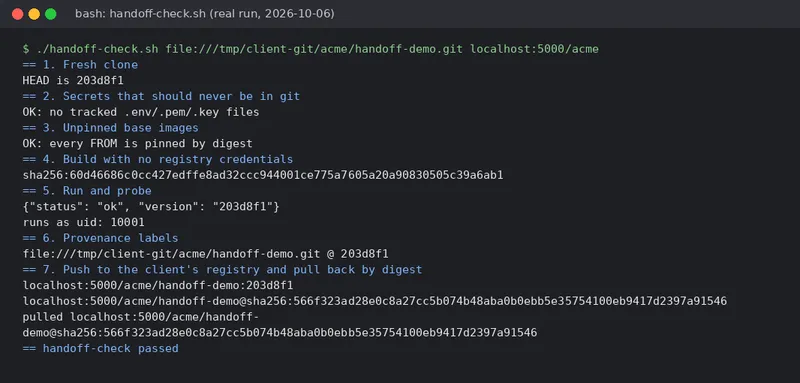
Some honest limits. The secret check only catches obvious file names; use a real scanner such as gitleaks or trufflehog for content. Step 4 still pulls the public base image anonymously, which is the point: public bases and your own registry, nothing else. And against a real registry you’d run the push step with a CI credential issued by your org, not with nothing.
I ask vendors to make this script (or their version of it) a CI job that runs weekly. The day it goes red is the day you find out about a dependency on someone’s laptop, instead of the day they leave.
The founder checklist
Paste this into the statement of work:
- Repo created in the company’s org on day one; at least two company owners;
CODEOWNERScommitted and enforced by branch protection. - Every
FROMpinned by digest; base images only from public registries or the company’s registry. - Images labeled with
org.opencontainers.image.sourceandorg.opencontainers.image.revision; containers run as non-root. - Container registry in the company’s cloud or org account; images tagged by commit SHA; production deploys by SHA or digest.
- CI defined in the repo, running under the org, using org-scoped secrets or the platform’s built-in token.
- A handoff check that clones, builds, runs and pushes with no vendor credentials, run in CI on a schedule.
- A written list of every external account the product depends on (DNS, email, payments, cloud), each with a company owner.
None of this slows a good vendor down. A vendor who pushes back on it is telling you something.
Environment used for this post
docker client 26.1.5+dfsg1 / server 26.1.5+dfsg1 (storage driver: vfs)git version 2.47.3actionlint 1.7.12Linux 6.12.94+ x86_64PRETTY_NAME="Debian GNU/Linux 13 (trixie)"Umair Abbas is the founder of CodeFlamme, a software agency in Lahore, Pakistan, that builds web, mobile and AI products where clients own the repo, CI and cloud from day one.
← Back to blog