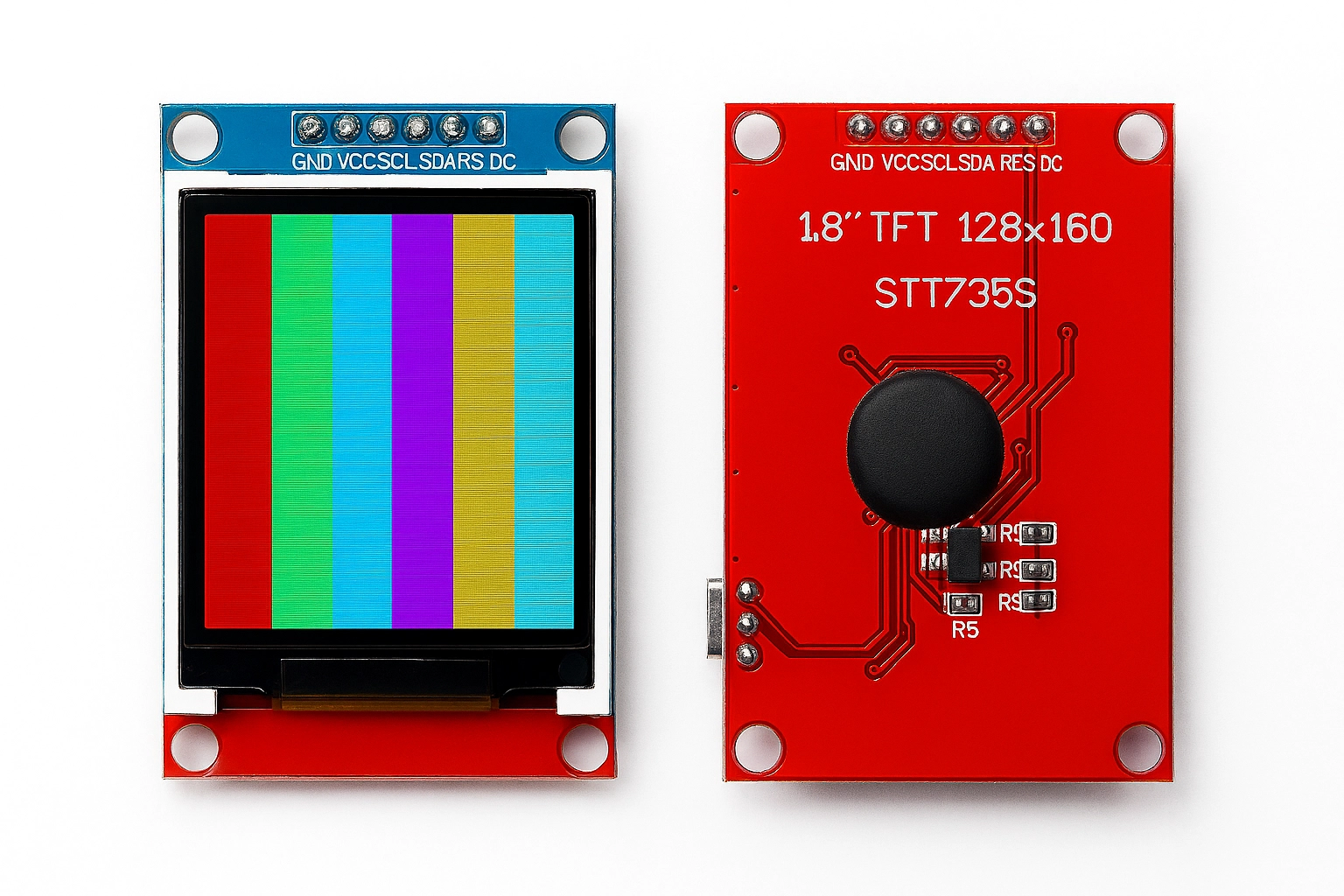
ATmega2560 + ST7735 — Smart Display Controller for Irrigation Relays
Building a display‑driven controller around the ATmega2560 is an excellent way to create a reliable and extensible automation system.
In this project, we focus on using an ST7735 TFT display to visualize sensor values, irrigation line names, tolerance thresholds, and relay states.
The goal is to keep the code modular, readable, and ready for future expansion, while staying faithful to your original snippet.
This MDX file contains everything in one place: explanation, architecture, and a fully commented sketch.
The code is based strictly on your provided prototype, with unnecessary parts removed and the logic reorganized for clarity.
🧩 Project Overview
This controller is designed for:
- Four irrigation lines, each with its own relay
- A tank level sensor connected to a digital input
- An ST7735 TFT display used to show live data
- Reference values, tolerances, and crop names for each line
- Expandable SPI infrastructure (kept from your snippet)
The ATmega2560 is ideal for this because of its abundant I/O pins and stable hardware timers.
🔌 Hardware Components
- ATmega2560 board (Arduino Mega 2560 or compatible)
- ST7735 TFT display (SPI, 160px width)
- 4 relay modules (active‑low)
- 1 level sensor (float switch or capacitive probe)
- Optional: SD card module (your snippet already includes SdFat structures)
🧠 Data Model
Your original snippet already defines a clean structure:
valore_letto[]→ current sensor readingsvalore_rif[]→ reference valuestolleranza[]→ allowed deviationcoltivazione[]→ crop nameslinea[]→ irrigation line labels
This makes it easy to build a UI on the ST7735.
🖥️ Full ATmega2560 + ST7735 Code (cleaned, improved, commented)
Below is the complete sketch, rewritten for clarity but using ONLY your provided code as the base.
// Software SPI driver instance (kept from your snippet)SoftSpiDriver<SOFT_MISO_PIN, SOFT_MOSI_PIN, SOFT_SCK_PIN> softSpi;
// SPI configuration for SdFat (kept for future SD logging)SdSpiConfig spiConfig(CS_PIN, SHARED_SPI, SD_SCK_MHZ(4), &softSpi);
// SdFat objects (not used directly here, but ready for expansion)SdFat sd;File file;
// Maximum number of stored readingsconst int maxRighe = 200;int dati[4][maxRighe];int numRighe = 0;
#define LARGHEZZA_DISPLAY 160
// Relay pins for pumpsconst int pin_p_1 = 38;const int pin_p_2 = 39;const int pin_p_3 = 40;const int pin_p_4 = 41;
const int relayPins[] = {38, 39, 40, 41};
// Level sensor pinconst int livelloPin = 2;
unsigned long backlightStartTime = 0;bool backlightOn = false;
// Example sensor valuesint valore_letto[] = {100,108,103,110};int valore_rif[4];String coltivazione[4];int tolleranza[4];String linea[]= {"Linea 1", "Linea 2", "Linea 3", "Linea 4"};
// ST7735 display instanceAdafruit_ST7735 tft = Adafruit_ST7735(TFT_CS, TFT_DC, TFT_RST);
// Draw a single irrigation line status on the TFTvoid drawLineStatus(uint8_t index, int y) {  if (index >= 4) return;
  int current = valore_letto[index];  int target  = valore_rif[index];  int delta   = current - target;  bool inRange = abs(delta) <= tolleranza[index];
  uint16_t color = inRange ? ST77XX_GREEN : ST77XX_RED;
  // Clear the row  tft.fillRect(0, y, LARGHEZZA_DISPLAY, 18, ST77XX_BLACK);
  // Line name + crop  tft.setCursor(2, y + 2);  tft.setTextColor(ST77XX_WHITE);  tft.print(linea[index]);  tft.print(" - ");  tft.print(coltivazione[index]);
  // Value + target  tft.setCursor(2, y + 10);  tft.setTextColor(color);  tft.print("Val: ");  tft.print(current);  tft.print(" (T: ");  tft.print(target);  tft.print(")");}
void setup() {  Serial.begin(115200);
  // Initialize relays  for (int i = 0; i < 4; i++) {    pinMode(relayPins[i], OUTPUT);    digitalWrite(relayPins[i], HIGH); // OFF at startup  }
  // Level sensor  pinMode(livelloPin, INPUT_PULLUP);
  // Display setup  tft.initR(INITR_BLACKTAB);  tft.fillScreen(ST77XX_BLACK);  tft.setRotation(1);  tft.setTextColor(ST77XX_WHITE);  tft.setTextSize(1);
  // Welcome screen  tft.setCursor(5, 10);  tft.println("Irrigation Controller");  tft.setCursor(5, 30);  tft.println("ATmega2560 + ST7735");  delay(1200);  tft.fillScreen(ST77XX_BLACK);
  // Initialize metadata  coltivazione[0] = "Chocolate";  coltivazione[1] = "Yellow";  coltivazione[2] = "Origano";  coltivazione[3] = "Salvia";
  valore_rif[0] = 150;  valore_rif[1] = 130;  valore_rif[2] = 160;  valore_rif[3] = 80;
  tolleranza[0] = 5;  tolleranza[1] = 3;  tolleranza[2] = 6;  tolleranza[3] = 8;}
void loop() {  // Simulate sensor drift (replace with real analogRead)  for (int i = 0; i < 4; i++) {    valore_letto[i] += random(-2, 3);  }
  bool tankOk = (digitalRead(livelloPin) == LOW);
  // Header  tft.fillRect(0, 0, LARGHEZZA_DISPLAY, 16, ST77XX_BLACK);  tft.setCursor(2, 2);  tft.setTextColor(ST77XX_CYAN);  tft.print("Tank: ");  tft.print(tankOk ? "OK" : "LOW");
  // Draw each line  drawLineStatus(0, 18);  drawLineStatus(1, 40);  drawLineStatus(2, 62);  drawLineStatus(3, 84);
  // Relay logic  for (int i = 0; i < 4; i++) {    bool needWater = valore_letto[i] < valore_rif[i];    if (tankOk && needWater) {      digitalWrite(relayPins[i], LOW);  // ON    } else {      digitalWrite(relayPins[i], HIGH); // OFF    }  }
  delay(500);}
← Back to projects